前端基于vue.js+webpack开发,如不懂请自行学习。官网上有详细的说明。或找我们二开
前端部分,请看前端说明文档
https://www.yunzmall.com/plugins/shop_server/knowledge/knowledge_detail/721?base_id=17&i=10&mid=277
https://www.yunzmall.com/plugins/shop_server/knowledge/knowledge_detail/721?base_id=17&i=10&mid=277
1.进入后端目录yun_shop,进行安装laravel依赖包
如没有composer请自行安装:
composer update –no-dev (composer命令使用说明请查看官网)
删除不需要的更新目录
find . -name “.git” | xargs rm -Rf
rm -rf composer\.* storage plugins
mkdir -p storage/framework/{cache,sessions,views}
mkdir -p storage/logs/{error,debug}
芸众框架(独立版)版本:
在商城根目录新建.env文件
APP_ENV=production
APP_KEY=base64:2q7s0Z714xS1L1WNN/8dsB69XDqOb4Qdptgh4X2ZtZU=
APP_DEBUG=False
APP_LOG_LEVEL=debug
APP_Framework=platform
IS_WEB=/admin/shop
ROOT_PATH=”
EXTEND_DIR=”
DB_HOST=”
DB_PORT=3306
DB_DATABASE=”
DB_USERNAME=”
DB_PASSWORD=”
DB_PREFIX=ims_
DB_SLAVE=false
DB_SLAVE_HOST=”
DB_SLAVE_PORT=”
DB_SLAVE_USERNAME=”
DB_SLAVE_PASSWORD=”
在商城根目录新建index.php文件
<?php
include_once __DIR__ . ‘/app/laravel.php’;
include_once __DIR__ . ‘/app/yunshop.php’;
打包文件:
zip -rqo5 zipname.zip *
2.迁移数据库字段
/path/to/php /path/to/yun_shop/artisan migrate
/path/to/php /path/to/yun_shop/artisan db:seed
3.配置守护进程
使用nginx或apache运行的用户执行,这个必须开机就执行
/path/to/yun_shop/daemon.sh /path/to/php
可以使用supervisor去管理进程
单机客户需要修改
supervisord.conf需要修改如下
[inet_http_server]
port=127.0.0.1:9001
集群客户需要修改
supervisord.conf需要修改如下
[inet_http_server]
port=*:9001
port=*:9001
守护进程配置
[program:domain]
process_name=%(program_name)s_%(process_num)02d
command=/path/to/daemon.sh /path/to/php
autostart=true
autorestart=true
user=www
numprocs=1
redirect_stderr=true
stdout_logfile_maxbytes=10MB
stdout_logfile_backups=5
stdout_logfile=/path/to/storage/logs/worker.log
process_name=%(program_name)s_%(process_num)02d
command=/path/to/daemon.sh /path/to/php
autostart=true
autorestart=true
user=www
numprocs=1
redirect_stderr=true
stdout_logfile_maxbytes=10MB
stdout_logfile_backups=5
stdout_logfile=/path/to/storage/logs/worker.log
说明:
/path/to/daemon.sh daemon.sh文件位置
/path/to/php php执行文件位置
/path/to/storage/logs/worker.log 日志位置
注意⚠️: 上述设置为通过yum源安装官方supervisor的修改,宝塔或其它途径安装自行学习研究.
商城后台填写相应服务器内网ip
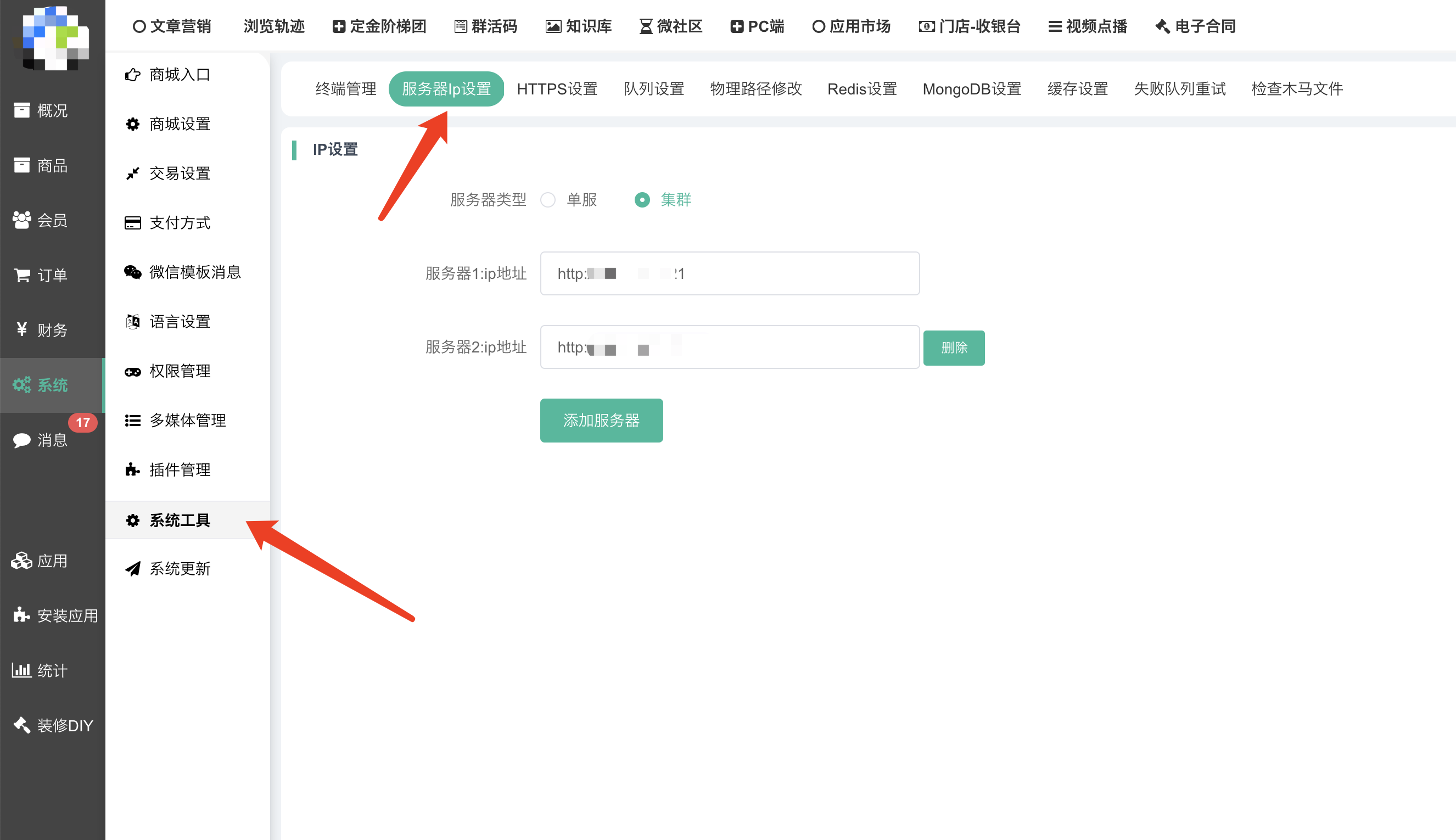
多少台后端服务器就填多少台
注意:
1、底层架构是负载均衡的,需要每台后端服务器都安装配置好supervisor
2、迁移服务器务必删除商城目录下bootstrap/cache/config.php缓存文件,并重启php程序(迁移也必须操作)
3.不要放通9001对公网访问,出问题的自行负责.